
Semablocks

Semablocks

Semablocks is an internal approach to building modular, reusable code blocks—inspired by Lego Blocks—that you can compose into larger applications.
Instead of writing monolithic scripts, you build small, versioned blocks in Bash, Python, Go, and other languages. These blocks can then be combined into composite workflows, orchestrated by a runner, and imported into your applications (like Flask).

Why Semablocks?

  • Reusability: Write once, reuse in multiple projects.
  • Versioning: Update or patch individual blocks without breaking larger workflows.
  • Cross-Language: Use Bash for automation, Python for data handling, and Go for high-performance binaries—all in one ecosystem.
  • Simplicity: Each block has a single responsibility, making debugging and scaling easier.

Example Project Structure

semablocks/
  blocks/
    bash/
      fetch_data/
        v1.0/
          fetch_data.sh
    python/
      parse_json/
        v1.1/
          parse_json/           # Python package
            __init__.py
            core.py
          pyproject.toml
          tests/
    go/
      generate_report/
        v1.0/
          cmd/
            main.go
          go.mod
  composites/
    daily_report/
      workflow.yaml
  orchestration/
    runner/
      run_block.py
      runner.go
  docs/
    index.md
  registry/
    index.json   # optional metadata index for all blocks
  • Blocks: Small, atomic units (e.g., parse_json for JSON parsing).
  • Composites: Combine multiple blocks into larger workflows (e.g., daily_report).
  • Orchestration: Scripts or binaries that run blocks in sequence.

Using Semablocks in a Flask Application

Step 1: Package a Python Block

A simple Python block (parse_json) could look like this in a core.py file:

import json

def parse_json_string(json_string):
    """Parse JSON and return a Python object."""
    return json.loads(json_string)

THe __init__.py would look like this:

from .core import parse_json_string

The pyproject.toml would look like:

[project]
name = "semablocks-parse-json"
version = "1.1.0"
description = "Semablock for parsing JSON"
dependencies = []

[build-system]
requires = ["setuptools", "wheel"]
build-backend = "setuptools.build_meta"

Build the block:

python3 -m build

This generates a .whl file under dist/.

Step 2: Install the Block in Your Flask App

You can install the package from a local build:

pip install dist/semablocks_parse_json-1.1.0-py3-none-any.whl

Or from your internal PyPI (see next section).

Step 3: Import and Use the Block in Flask

From your app.py:

from flask import Flask, request, jsonify
from semablocks_parse_json import parse_json_string

app = Flask(__name__)

@app.route("/parse", methods=["POST"])
def parse():
    data = request.get_data(as_text=True)
    try:
        result = parse_json_string(data)
        return jsonify(result)
    except Exception as e:
        return jsonify({"error": str(e)}), 400

if __name__ == "__main__":
    app.run()

Using an Internal PyPI with Semablocks

For distributing Python Semablocks across multiple projects and teams, set up an internal PyPI-like registry.

Option 1: Devpi (Lightweight Internal PyPI)

Install Devpi

pip install devpi-server devpi-client

Initialize and Run

devpi-server --start --host 0.0.0.0 --port 3141
devpi use http://localhost:3141
devpi login root --password=''
devpi user -c myuser password=secret
devpi index -c semablocks
devpi use semablocks

Upload a Block

From your block directory:

python3 -m build
devpi upload

Install from Internal PyPI

pip install --index-url http://myuser:secret@your-internal-pypi:3141/semablocks semablocks-parse-json==1.1.0

Option 2: Private GitHub Repo

For quick adoption, you can also host your block in a private GitHub repo and install directly:

pip install git+ssh://git@github.com:YourOrg/semablocks.git@main#subdirectory=blocks/python/parse_json/v1_1

Summary

Semablocks lets you build modular, reusable code blocks that integrate seamlessly into larger applications like Flask.

Use an internal PyPI (e.g., Devpi) to easily distribute Python Semablocks across projects.

With proper packaging, your blocks are versioned, reusable, and maintainable.

The Power of Daily Progress Logging

In our fast-paced world of rapid development and AI-assisted building, we often find ourselves so obsessed with the activity of “shipping” without truly understanding what we have accomplished along the way. We live in this culture of “shipping” projects in record time, yet paradoxically, many of us struggle to see our own progress clearly.

This is where the ancient practice of logging and self-journaling becomes not just relevant, but essential. The act of documenting what you have built, what you have learned, and what you have overcome creates something far more valuable than a simple record, it actually builds a foundation for sustained motivation and clear progress tracking.

Why Logging Your Work Transforms How You Build

1) Creates Accountability and Clarity
When you sit down each day to write “what have I shipped today?”, you are forced to put your efforts into concrete achievements. This seemingly simple exercise reveals the difference between being busy and being productive. It transforms vague feelings of “I worked hard today” into specific, measurable outcomes.

2) Builds Momentum Through Visible Progress
There is psychological power in seeing your daily entries accumulate into weeks and months of documented growth. Each log entry becomes evidence of forward movement, creating a visual timeline that captures the common developer experience of feeling of “not making progress”. When motivation fades, you can look back and see what you have built.

3) Identifies Patterns and Bottlenecks
Over time, your logs reveal patterns you could not initially see in the moment. For instance, you will notice which types of work energize you, which tasks consistently take longer than expected, and where you tend to get stuck. This information allows you to optimize your process and avoid repeated mistakes.

4) Transforms Setbacks into Learning
Bad days become valuable data points rather than sources of discouragement. When you log struggles alongside successes, you create a more honest and ultimately more motivating record of your journey. You will see that every successful builder has days of debugging, refactoring, and starting over.

5) Creates a Personal History of Growth
Your logs become a unique timeline of your development as a builder. Looking back at entries from months ago, you will be surprised at how problems that once seemed difficult now feel like a routine. This perspective shift is incredibly motivating and builds confidence for tackling new challenges.

The challenge is not understanding the value of logging, but rather making it simple and enjoyable enough to become a daily habit. That is exactly why we created ShipReport.

Introducing ShipReport

ShipReport is a simple Flask application that provides a Claude.ai-like interface for logging daily ship reports. Born from our own need to track progress and stay motivated, it removes complexity to focus on the essential act of documenting what was accomplished.

shipreport landing ShipReport - Landing Page

The application stores logs in a PostgreSQL database and displays them in a clean, user-friendly interface with user authentication. It does not matter if you are a solopreneur working on side projects or part of a team wanting to track individual contributions, ShipReport makes it effortless to build the logging habit that transforms how you work.

Core Features

Core Functionality:

  • Clean, minimalist interface similar to Claude.ai with a welcoming “Hello [username], what have you shipped today?” prompt
  • Centered input area with markdown support for rich text formatting
  • Personal logs that are only visible to the user who created them
  • User registration and authentication with session-based security
  • PostgreSQL database for reliable, persistent storage

shipreport index ShipReport - Index Page for Logging

Time-Based Organization:

  • Recent logs for individual entries ordered by creation date
  • Weekly logs that aggregate entries by week, perfect for weekly reviews
  • Monthly logs that aggregate entries by month, ideal for broader reflection
  • All timestamps stored in UTC with user timezone preferences for display

Design and Usability:

  • Responsive design that works seamlessly on desktop and mobile
  • Dark mode and light mode switching for comfort in any environment
  • Markdown support including headers, bold, italic, code blocks, lists, and links
  • Clean typography and spacing optimized for readability

shipreport login ShipReport - Login Page

User Experience:

  • Simple registration with name, email, and password
  • Automatic author attribution using the logged-in username
  • Intuitive navigation between different time views
  • Fast, responsive interface that does not get in the way of your thoughts

Technical Implementation

Setup Instructions

Prerequisites:

  • Python 3.8 or higher
  • PostgreSQL

Project Structure

ship-report/
├── app.py                  # Main Flask application
├── requirements.txt        # Python dependencies
├── .env.example            # Example environment variables
├── static/                 # Static assets
│   ├── css/
│   │   ├── style.css       # Main application styles
│   │   └── auth.css        # Authentication page styles
│   └── js/
│       └── script.js       # Client-side JavaScript
└── templates/
    ├── index.html          # Main application template
    ├── login.html          # Login page
    └── register.html       # Registration page

Roadmap: Building Beyond the MVP

Immediate Improvements:

  • Enhanced aggregate views for weekly and monthly summaries

User Experience Enhancements:

  • Password reset functionality
  • Export data functionality using ship.report URL shortener
  • Search functionality across all logs
  • Tagging system for better organization using [project] syntax

Motivation and Engagement:

  • Streak tracking similar to GitHub’s contribution graph
  • Weekly and monthly email notifications summarizing accomplishments
  • Status page at status.shipreport.com for transparency

Growth and Sustainability:

  • S3 bucket backup for data reliability
  • Social media integration with link to x.com/ShipReport
  • Stripe payment integration - $5/month subscription model
  • A more detailed logs directory in the application root directory with comprehensive logging metadata of every entry (for debugging and troubleshooting purposes)

Why This Matters

ShipReport is not just another productivity tool, we see it as a commitment to the idea that progress becomes real when you take the time to see it clearly. In a world of endless todo lists and project management complexity, sometimes what you need most is the answer to a simple question: “What did I ship today?”.

The act of answering that question daily, in your own words, with the knowledge that you are building a personal timeline of growth. We think that is where the real magic happens. It is where PRs and specs transforms into visible progress, where discouraging days become valuable learning experiences, and where the long journey of building something meaningful becomes motivating. Oh, and in case you were wondering, the logo of ShipReport is AI-generated by Chatgpt.

Start logging. Start shipping. Start seeing your progress clearly.

Get Started: shipreport.com


Credits: ShipReport Logo was AI-generated by Chatgpt

This Friday, we went for a simple hack: writing a simple “Launching Soon” website for Polydigital, hosted via Github Pages.

Polydigital is an upcoming startup that focuses in Web3 and dWeb technologies, specially on both the Ethereum and Handshake blockchains. We wanted to come up with a very simple and elegant design. We decided to try the “WeBuild” template fom BootstrapMade (which we have a license).

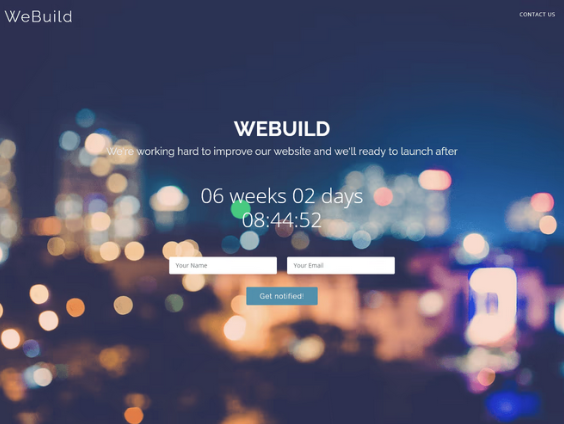
The template was very easy to use and the original version looks like this:

WeBuild Template

We removed some unnecessary information such as the countdown and the contact-us form, to keep it more simplistic and give it a “Stealth Mode” vibe

We added Polydigital’s logo and we looked for a royalty-free red background image that can transmit the concept of “poly” or “multiple”, and the first idea that came to mind was to implement a 3D version background containing some polygons. We found this amazing design on Pixabay and we went with it

Red Triangles

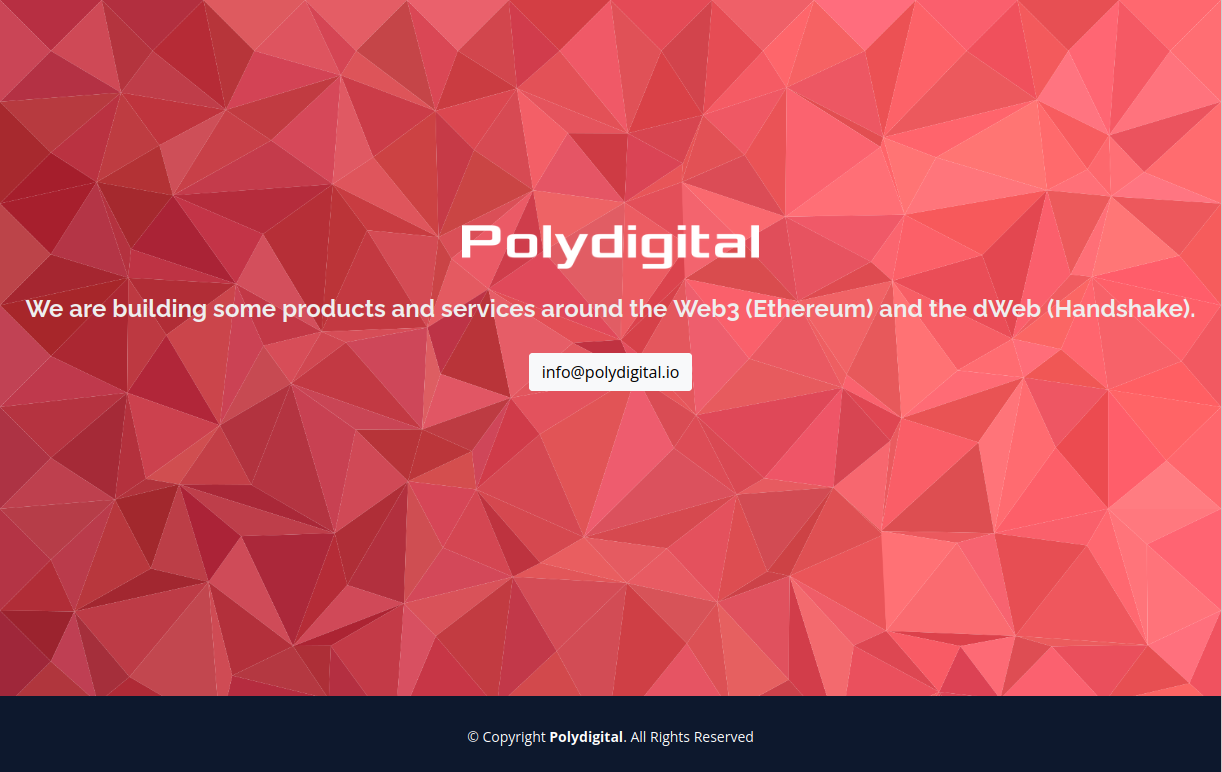
The final (prototype) design came together as follows:

Polydigital Prototype

Now, it is important to point out that the background image does not look very well for large-sized screens. For instance, it does not look great on a 34” screen (as the image is more for square-type of windows), but it does look great on mobile phones. Another important part to mention is that the logo resizing needs work. It looks ok on a big screen, but too small on a mobile phone. Not a big deal, but it is something to fix in the future.

Finally, we added a contact button showing the contact email and we left plenty of space for Social Media links.

Credits:

This week we focused on monitoring infrastructure. We decided to test an uptime monitoring solution with UptimeRobot

UptimeRobot

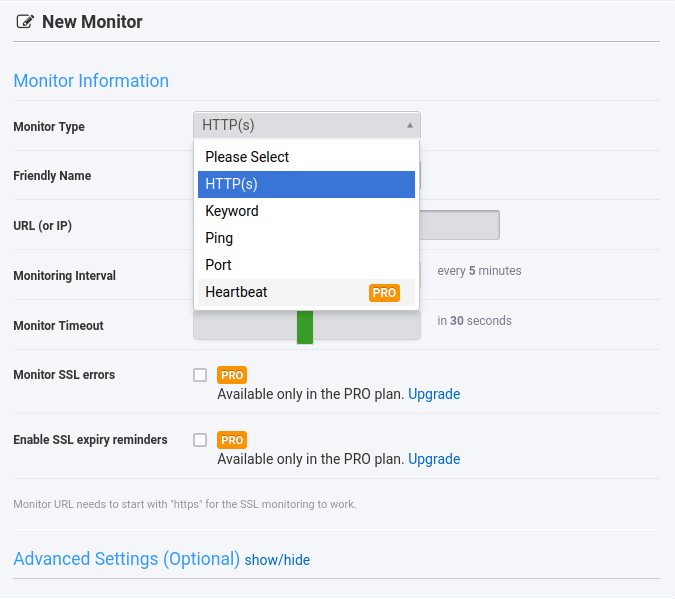
UptimeRobot offers a free tier account where you can set up to 50 monitors. Each monitor can perform one of the following operation: check HTTP(S) of a website, check if a keyword is present in the code of a website, ping an IP (or host), check port, or check heartbeat of a site

New Monitor

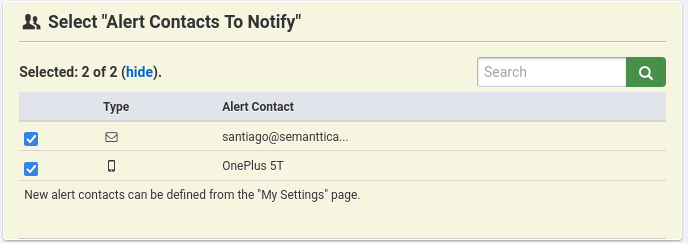
Then, you can specify to set the alerts to email and phone notifications. UptimeRobot also has an app on both the AppStore and GooglePlay

New Alert

We have added a total of 11 monitors (different websites to check) with the goal of seeing if they go down. We will then test the ping option and the port option

More documentation available at:

https://uptimerobot.com

After a couple of years of being offline and inactive, we are making efforts to bring FridayHacks back online. We have been updating Ruby and other Jekyll dependencies and we have been able to fix some issues blocking us from posting.

We want to continue our original mission of trying out and explorining different technologies on Friday nights with the purpose of learning and discovery. We have not been consistent with this goal these past years, it is has been mainly associated with a lack of organization and planning. One of the important points to highlight is that we will try to be more organized and try to schedule sessions in advanced. We have an extensive list of projects and ideas we want to try, and we have not been able to cross any item of the list. We want to change that this year. We are excited to slowly bring this site to its full momentum and we will include livestreams in the near future.

Time to build.